
DJI O4 / O4 Pro Air Unit Vibration Problem FixUpdated 3 months ago
In this article, we explain why vibrations, shaking, or so-called “jello” can appear in the video feed of the DJI O4 / O4 Pro Air Unit and how you can fix this issue.
Problem
On some setups, slight vibrations, shaking, or jello can be visible in the image of the DJI O4 / O4 Pro Air Unit.
This does not automatically mean that the Air Unit or camera is defective. In many cases, the issue is caused by ESC settings, motors, propellers, the frame, or the camera mount.
Cause
A common trigger is the selected PWM frequency of the ESCs.
At 24 kHz PWM, fine motor vibrations can occur and transfer through the frame to the camera. Additionally, this frequency range may interfere unfavorably with the internal gyro data or image stabilization of the DJI O4 / O4 Pro Air Unit.
As a result, the camera may pick up these vibrations more strongly. In the video, this can appear as slight shaking, vibration, or jello.
With 48 kHz PWM, the motors run smoother on many setups. At the same time, the critical frequency range is shifted, which can significantly reduce or completely eliminate visible vibrations in the image.
Solution
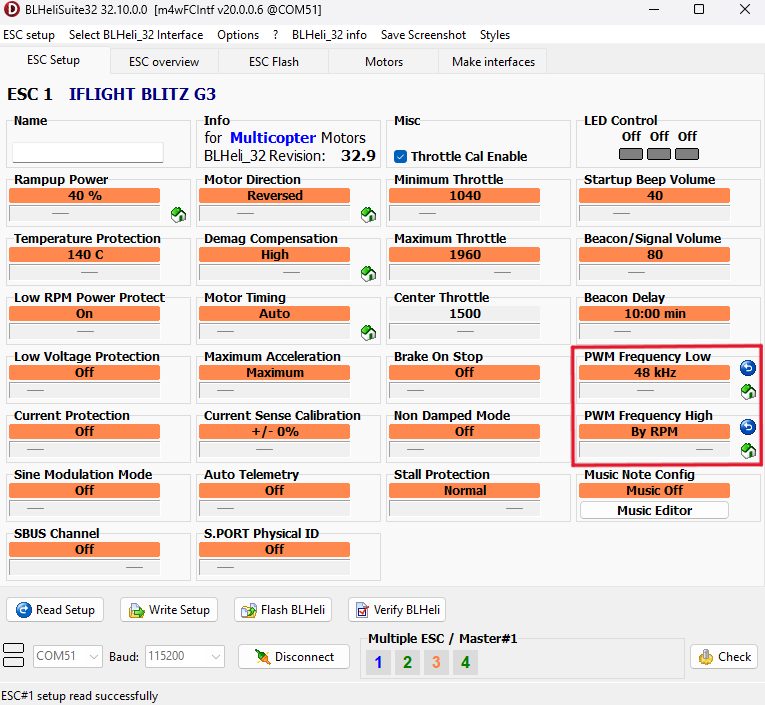
Set the PWM frequency in the ESC Configurator to 48 kHz and write the settings to the ESCs.
Preparation
To read and write the ESC settings, the ESC must be powered.
Please proceed as follows:
- Remove all propellers from your drone for safety.
- Connect a suitable LiPo battery to your drone so the ESC gets power.
- Then connect your drone to your computer.
- Plug the USB-C cable into the flight controller.
- Open the ESC Configurator on your computer.
Step-by-step instructions
- Make sure the LiPo battery is connected.
- Make sure the drone is connected to the computer via USB-C.
- Open the ESC Configurator.
- Click Connect.
- Click Check to read the current ESC settings.
- Set the following values:
- PWM Frequency Low: 48 kHz
- PWM Frequency High: RPM
- Click Write Setup.
- The new settings will now be written to your ESCs.
- Disconnect the drone from the computer.
- Disconnect the LiPo battery from the drone.
- Test the camera image again.
Result
After changing the setting, the vibrations in the image of your DJI O4 / O4 Pro Air Unit should be significantly reduced or no longer occur.
If the issue still persists
If vibrations are still visible, please also check the following points:
- Check the propellers for damage or imbalance
- Check the motors for rough running or damaged bearings
- Check the screws on the frame
- Check the camera mount
- Make sure the camera / Air Unit is not mounted too rigidly
- Check whether the frame is damaged or bent
Even small damage to propellers, motors, or the camera mount can cause visible image vibrations.
Note
This setting is especially helpful if the vibrations only occur with certain ESC PWM settings. If the issue still persists after changing the setting, the cause is most likely related to the propellers, motors, frame, or camera mounting.